
UX & Design Strategies

A UX strategy is a plan that defines how a business intends to create a meaningful and flawless user experience for the target users of a digital product or service. An effective UX strategy helps the organization to create and operate on a shared vision of the desired state of the user experience while setting clear objectives and creating a plan to achieve them.

A UX strategy always comes on the tail of user research

With user research being the backbone of an effective UX strategy, we can ensure that we are taking a data-driven approach to the development of the product

Designing a meaningful product is one thing, but making sure this is aligned with the specific needs and goals of the business is of utmost importance for a successful UX strategy.

UX Strategy: 

  • Allows for scalability: UX team thinks beyond the current requirements and user behaviors. This means that the user experience of a product can be seamless throughout its different features 
  • Drives innovation 
  • Creates brand reputation 
  • Create a competitive advantage for the organization 


UX strategy consists of three main elements:

Vision: Desired future state of the user experience

Goals: These goals should be clear and measurable and they should be aligned with any KPIs and any UX metrics that are set by the company.

Plan: All the actions that need to be taken to meet the set goals and achieve the vision.
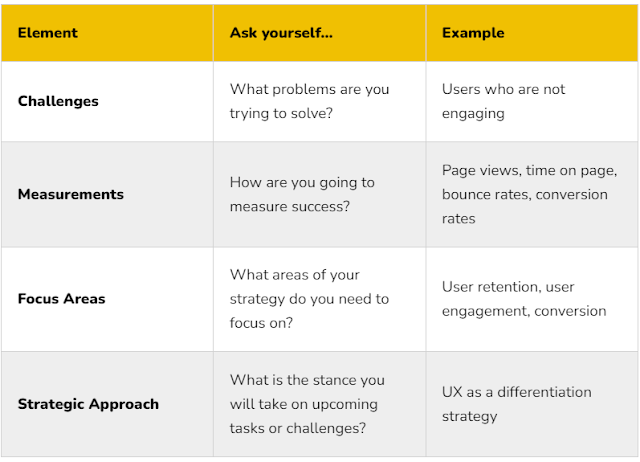
Table to navigate these - 

How to achieve this?
Research - qual & quant 
User and stakeholder interviews 

Goal Setting & Planning
This can include setting the milestones, key initiatives, as well as timelines for those to be achieved.

Iterating
Gathering user feedback and iterating to always stay aligned with the user and business needs will ensure that your UX strategy stays impactful throughout the product lifecycle and the ever-changing needs of the market!


Examples
Vision Examples: 
Deliver a caring and convenient digital healthcare experience for patients and providers. 

Goal Example:
User: Increase healthcare access and convenience.
Business: Grow/maintain patient and provider populations.
• 20% increase in new patients
• 30% increase in telehealth usage
• Flat for providers and patients

Plan Formats:
• Roadmaps
• Presentation decks
• Spreadsheets
• Digital or physical whiteboards 


Goals


Goals example: 


Comments

Popular posts from this blog

Reasons to run an UX workshop within a team

Running a User Experience (UX) workshop within a team can be highly beneficial for various reasons. UX workshops are collaborative sessions that bring team members together to focus on improving the user experience of a product or service. Here are some compelling reasons to run a UX workshop within your team: 1. Shared Understanding: A workshop can help ensure that all team members have a common understanding of the user's needs, goals, and pain points. This shared understanding is crucial for effective collaboration. 2. Cross-Functional Collaboration: UX workshops often involve members from different departments, such as designers, developers, marketers, and product managers. This cross-functional collaboration fosters diverse perspectives and innovative solutions. 3. User-Centered Focus:  Workshops can help teams better understand user needs, pain points, and preferences. By prioritizing the user experience, you increase the likelihood of creating a product that meets customer...

Design Proposal: A Comprehensive Banking Payments App

Understanding the User and Business Goals User Goals: Convenience: Easy access to accounts and seamless transaction processing. Security: Robust security measures to protect financial information. Insights: Clear financial overview and personalized insights. Support: Reliable customer support channels. Business Goals: Customer Acquisition: Attract new customers and increase market share. Customer Retention: Improve customer satisfaction and loyalty. Revenue Generation: Increase transaction volume and fee income. Operational Efficiency: Streamline processes and reduce costs. UX Design Principles Simplicity: Clean, intuitive interface with minimal clutter. Clear and concise navigation. Easy-to-understand information hierarchy. Security: Strong authentication methods (biometrics, PIN, OTP). Secure data encryption and transmission. Regular security updates and vulnerability assessments. Personalization: Tailored user experience based on preferences and...

Questions for Usability Testing

Layout design  What is your first impression of this design/layout? What do you notice first when you look at this screen/page? Did you have any trouble understanding the interface? Design clarity  How would you rate the clarity of the instructions/guidance provided? Do the options/buttons/links make sense to you? Are there any terms or language used that are unclear? Were there any elements on the screen that distracted you or seemed unnecessary? Design look and feel  How did using this product make you feel? Were there any moments of frustration or delight while using this product? How does the overall aesthetic appeal to you? How would you describe the tone and language used in the product? How would you describe the overall look and feel of the interface? Does anything stand out to you immediately as either positive or negative? Findability and navigation experience  Were you able to find all the necessary information to complete this task? How easy or difficult ...